Overview
Continuous Verification is a lightweight telemetry and risk analysis framework designed to continuously validate that corporate devices are being operated by the authorized employee and not by unauthorized third parties, remote operators or covert access infrastructure.
The platform collects and analyzes signals, generates detections and risk indicators and surfaces findings through the Devices view - including risk level and supporting evidence.
The solution ensures that:
Devices are continuously monitored for anomalous access patterns and operator behavior.
Risk signals are correlated and scored across multiple telemetry dimensions.
Security teams receive actionable findings without disrupting day-to-day employee workflows.
How does it work?
Continuous verification operates as a background telemetry layer on enrolled corporate devices. Once deployed, it passively collects signals and applies risk analysis without requiring any action from the employee.
imper deploys lightweight verification scripts to managed employee devices through the organization’s existing MDM infrastructure. The solution is MDM agnostic and integrates with platforms such as Iru, Intune, and other enterprise device management systems.
Signal collection
A broad set of behavioral and environmental signals is captured , including:
Device activity patterns and usage cadence
Input behavior and interaction anomalies
Network access context and remote session indicators
Process and application telemetry
Environmental signals that may suggest unattended or third-party operation
Risk Analysis Engine
Collected signals are processed by the risk analysis engine, which applies correlation logic and scoring models to identify indicators of unauthorized access or covert operation. The engine evaluates:
Deviation from the employee's established behavioral baseline
Presence of remote access tooling or suspicious process chains
Temporal anomalies and session-level inconsistencies
Cross-signal patterns associated with unauthorized operator activity
Detection and Risk Scoring
When the engine identifies a meaningful risk pattern, it assigns a risk level:
Devices
Two summary cards at the top of the view give an at-a-glance read.
Total devices - Shows the total number of enrolled devices associated with the blueprints configured by the admin on the Integrations page, broken down by verification status.
Passed - devices that completed verification with no active risk indicators.
Risky - devices with one or more active risk indicators. These are the devices listed below.
Unsynced - devices that have not reported recent telemetry and could not be evaluated.
Risky devices by risk level - Shows the count of risky devices grouped by severity:
High - devices with a critical risk indicator that warrants immediate review.
Medium -devices with an elevated risk indicator that should be reviewed.
Devices List
The list shows every device currently flagged with a risk indicator. Each row represents one device and its highest-severity detection.
Column | Description |
|---|---|
Device | The device that reported telemetry. |
User | The account associated with the device at the time of detection. |
Risk level | The severity of the detection: High or Medium. |
Risk type | The category of behavior or artifact that triggered the detection (for example, Remote control or Suspicious software). |
Last seen | The timestamp of the most recent telemetry report from the device. |
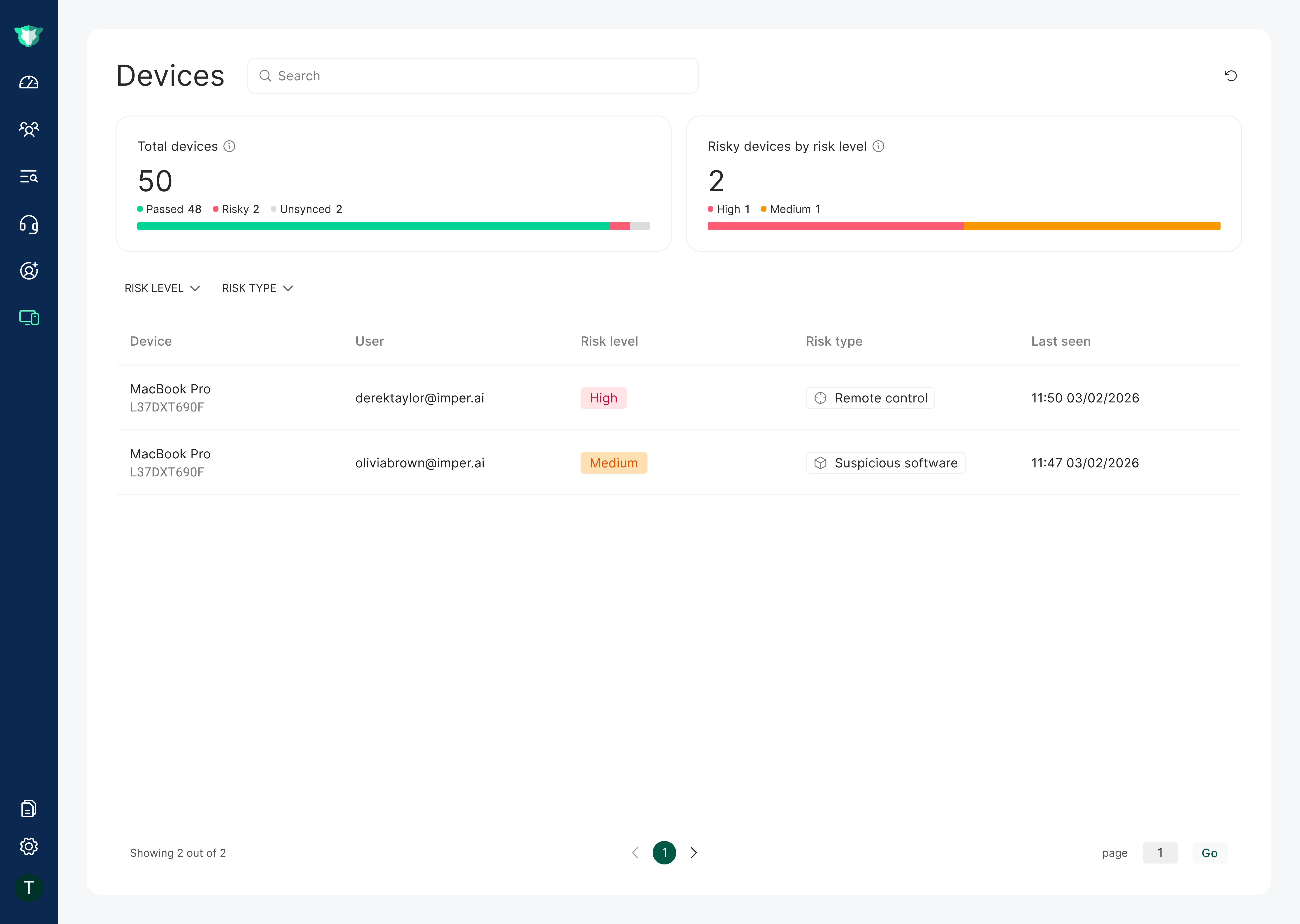
Devices View
Risk Types
Risk type identifies what kind of risk indicator was detected on the device. Common categories include:
Remote control — remote access or screen-control tooling that may indicate the device is being operated by someone other than the legitimate user.
Suspicious software — installed applications or processes that match known risk signatures or deviate from the device's behavioral baseline.
Additional risk types appear here as new detection categories are added to the platform.
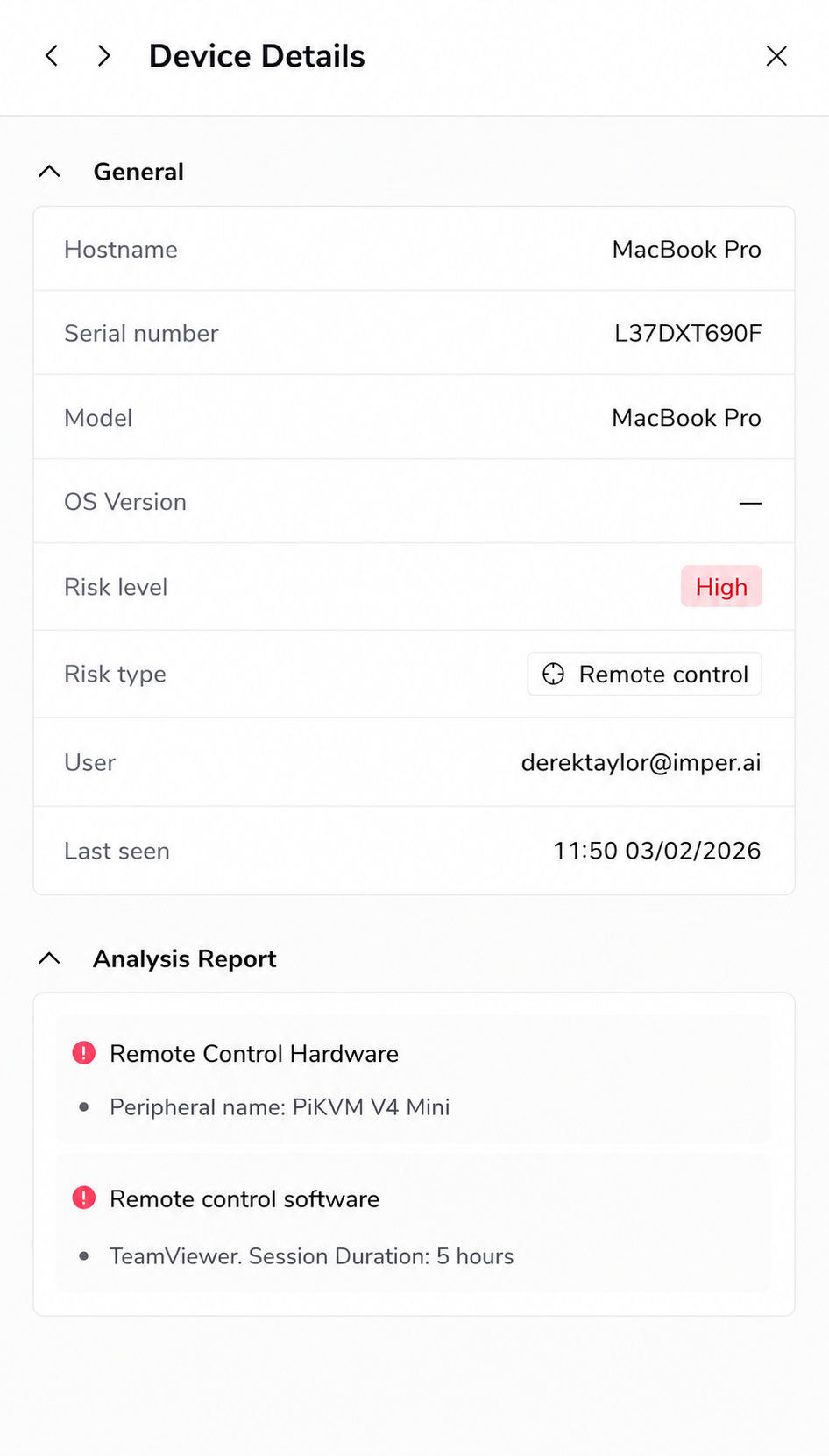
Device Details
The Device Details pane is the drill-down view for a single device. Open it by selecting a device from the Devices list. It brings together the device's identifying information and the full set of detection events that contributed to its risk score, so you can investigate a flagged device and decide how to respond.