Overview
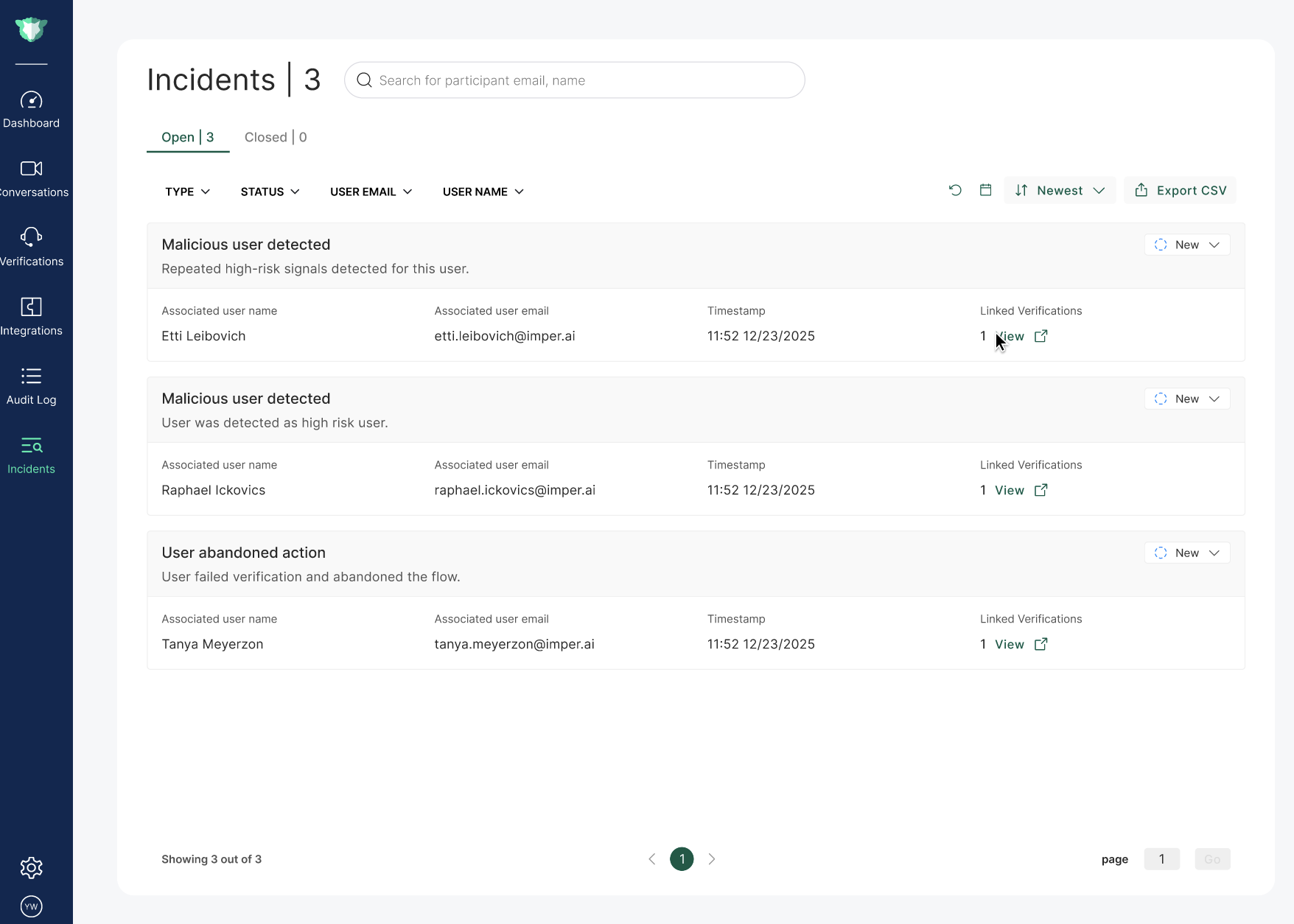
The Incidents page provides a centralized view of incidents detected by the platform during identity verification workflows. It enables administrators and security teams to monitor suspicious activity, investigate potential threats, and track incident resolution.
Each incident contains relevant user information, verification details, and a status that reflects the current stage of investigation.
Incident Types
The platform currently detects the following types of incidents:
User Abandoned Verification
A verification attempt was initiated but not completed within the expected timeframe. As a result, the user did not regain account access. This behavior may indicate suspicious activity.
Malicious User Detected
The system identified the user as high risk and potentially malicious based on the platform's detection mechanisms.
Incident Information
Each incident displayed on the page includes the following fields:
Incident Type – The category of the detected incident.
Associated User Name – The name of the user involved in the incident.
Associated User Email – The email address of the user related to the incident.
Last Verification Time – The timestamp of the most recent verification attempt associated with the incident.
Linked Verifications – The verification sessions associated with the incident, including the total number of verifications within the incident’s scope. Clicking View redirects you to the Verifications page, where the relevant verifications are automatically filtered.
Incident Status
Each incident is assigned a status that reflects its investigation and resolution stage. The status can be updated as the incident is reviewed on the top right corner of each incident.
New – Newly reported incidents that have not yet been reviewed.
In Review – Incidents currently being investigated.
Confirmed Threat – A threat has been confirmed and appropriate actions have been taken to mitigate it.
Resolved – The incident has been investigated and determined not to represent a threat.

Incident Tabs
The Incidents page is divided into two tabs to help organize incident management:
Open – Displays active incidents that are still under investigation or require attention.
Closed – Contains incidents that have been resolved. Incidents with the Resolved status are automatically moved to this tab.
Filtering and Sorting
To help quickly locate relevant incidents, the page includes filtering and sorting capabilities.
Filters
You can filter incidents by:
Incident Type
User Name
User Email
Status
Date Range
Sorting
Incidents can be sorted by any of the available fields to help prioritize investigations or review recent activity.