The Self-Service Portal (SSP) is where end users complete identity verification after receiving a secure Verification Portal Link from a helpdesk agent. The SSP guides the user through a multi-layer verification process that includes both silent environmental checks and interactive challenge questions.
Only after the user passes SSP verification will their status update to Verification Completed, allowing the helpdesk to proceed with sensitive workflows such as password resets.
This article explains what users experience in the SSP and how it appears in the imper.ai Helpdesk ecosystem.
Entry Point: Verification Portal Link
Users access the SSP by clicking the SMS or email link sent by a helpdesk agent.
Once the user clicks the link, they are taken directly into the SSP verification flow.
Verification Flow Inside the SSP
The SSP performs multi-layer identity verification using the following components:
1. Infrastructure Verification (Silent Layer)
Imper.ai automatically checks:
IP address & geolocation
VPN/proxy indicators
Device type & integrity
Browser environment
Behavioral signals
These checks run silently, without any required interaction.
2. Knowledge Verification (Challenge Questions)
Users are asked 3–4 customized questions generated from connected organizational systems and personal context, such as:
Recent calendar events
Group memberships
Known organizational associations
Scheduled meetings
Incorrect, partial, or skipped responses contribute to the final risk score.
Completion Notification
Once the user finishes the SSP verification flow:
They receive a completion message
Their verification status updates in the Helpdesk Console
A risk score is calculated
A full Verification Summary Panel becomes available to helpdesk agents
If the user fails the challenge or skips required questions, the SSP ends and instructs the user to contact helpdesk.
Post-Verification Actions
If the user successfully passes the SSP verification, they are automatically presented with the actions that were enabled by the helpdesk agent for this verification session (for example, password reset or other permitted workflows).
The user can then proceed to complete the requested action directly within the portal.
Once the action is completed:
The user is shown a completion confirmation message
A user feedback form is presented, allowing the user to report their experience or flag any issues encountered during the process
This feedback becomes visible to the helpdesk agent in the verification record and can help identify situations where the user experienced difficulties or where additional assistance may be required.
How SSP Data Appears to Helpdesk Agents
Once the user completes (or fails) verification:
The record updates in Helpdesk Verifications
Agents can open the Verification Summary Panel to view detailed analysis
The challenge-response Transcript becomes available
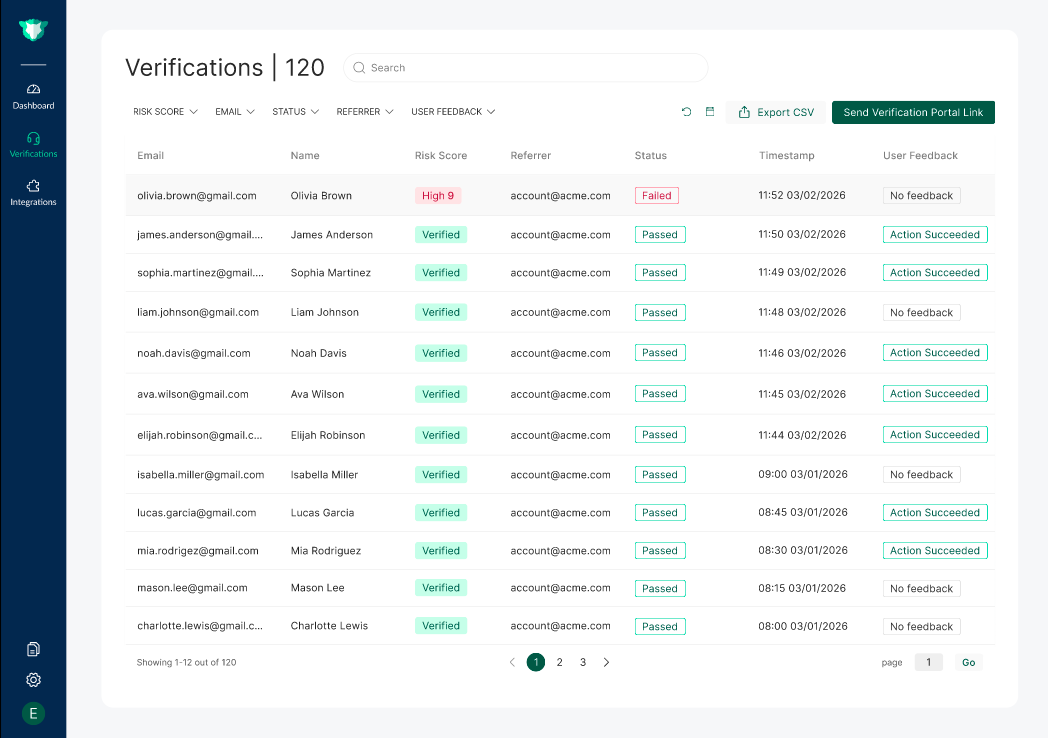
Helpdesk agents review the SSP results in the Verification Summary Panel, including risk scoring and analysis layers
The SSP’s output directly drives whether the helpdesk can safely proceed with a password reset or other sensitive action.