imper.ai secures high-risk workforce identity moments by verifying that the person interacting with your organization is legitimate and not an impersonator, proxy interviewer, or attacker-controlled environment. imper.ai prevents impersonation, social engineering attacks, and account takeover by combining:
An Impersonation Detection Engine that identifies attacker-controlled environments
AI-Driven Contextual Verification that confirms the real employee through work familiarity
Continuous, risk-based verification throughout critical workforce workflows
Rather than inspecting media content or relying on static identity checks, imper.ai verifies infrastructure authenticity and human legitimacy in real time.
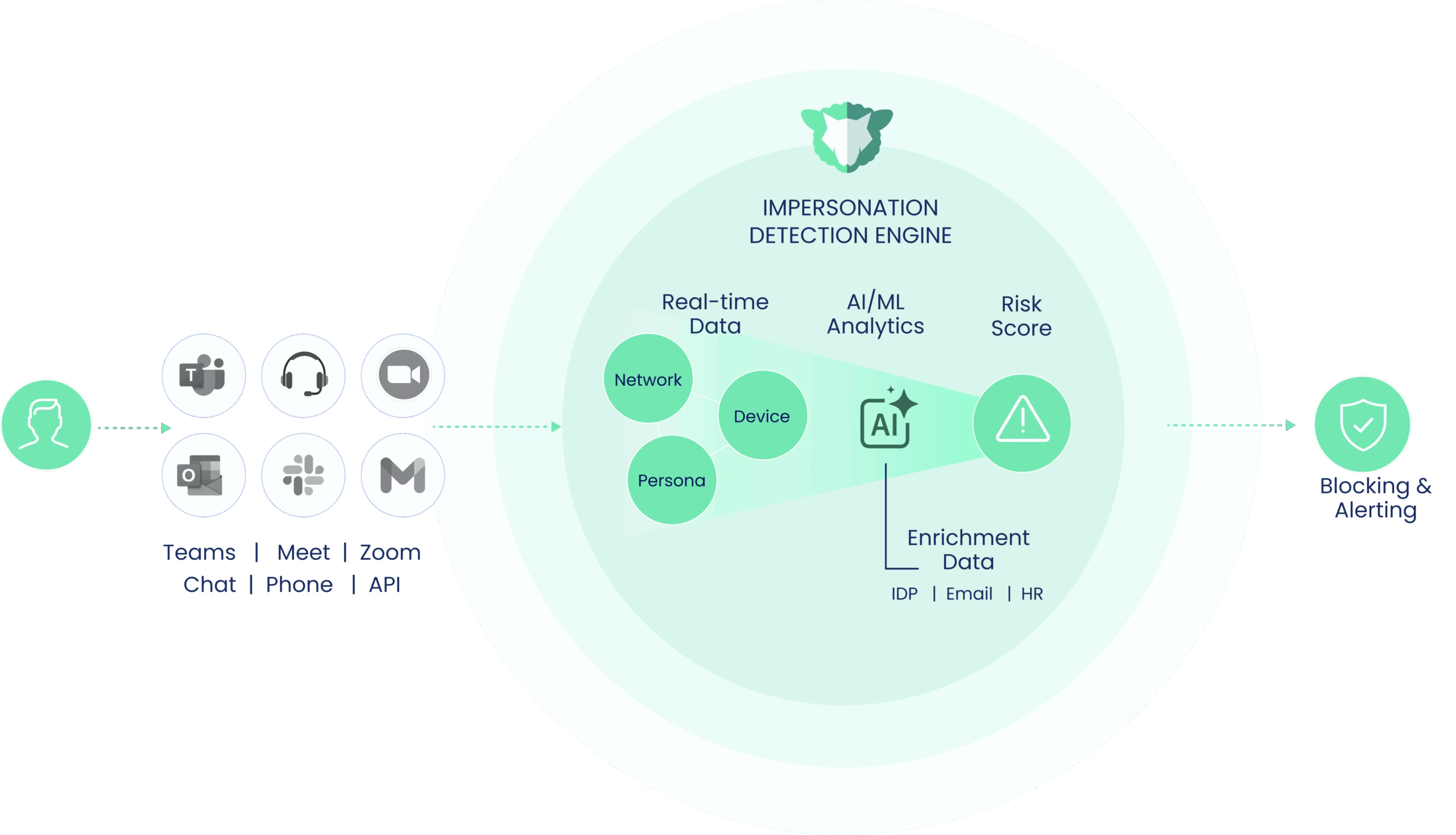
This article explains the core components of the imper.ai Workforce Identity Verification platform and how verification works end-to-end.
1. What imper.ai Does
imper.ai prevents workforce impersonation across high-risk lifecycle events, including:
Help desk account recovery and MFA resets
Hiring and onboarding workflows
Credential issuance
Shadow workforce and credential sharing scenarios
Ongoing employee lifecycle activity
It acts as a security layer that wraps around your existing technology stack to ensure there are no extra steps for your team —Applicant Tracking Systems like Greenhouse and UKG, Zoom, Teams, Google Meet, and more.
2. Core Platform Components
2.1 Impersonation Detection Engine
Identifies Attacker-Controlled Environments
At the start of an interaction (whether during a help desk call, interview, or account recovery session), imper.ai analyzes infrastructure and behavioral signals such as:
Device characteristics
Virtualization artifacts
Network patterns
Remote control tooling traces
Historical consistency
Organisation-level identity sources (Entra, Okta, Google Workspace, etc.)
These signals generate a dynamic risk score that determines whether verification should proceed, step-up, or block.
Attackers struggle to consistently fake infrastructure-level signals at scale.
2.2 AI-Driven Contextual Verification
Verify the Person
When risk thresholds require step-up verification for employees, imper.ai deploys a real-time AI verification layer embedded directly into the workflow.
Instead of static knowledge questions or document uploads, the system asks dynamic, role-based operational questions tailored to:
The employee’s role
The workflow stage
Industry context
These are not typical knowledge-based questions that are found on the dark web. They are moment-specific contextual questions that only the legitimate employee will know.
2.3 Workflow Embedding
imper.ai connects to your existing enterprise tools to enforce identity assurance wherever conversations happen:
imper.ai integrates directly into existing enterprise systems, including:
ITSM platforms
Identity providers (IDP)
Applicant tracking systems (ATS)
HR systems
IVR and phone workflows
Meeting platforms
Workflows remain intact.
Help desk agents operate as usual
Recruiters conduct interviews as usual
Employees follow standard recovery processes
imper.ai runs in the background:
Detecting impersonation risk
Triggering contextual verification when necessary
Enforcing policy automatically
Logging events for SOC and compliance review
Integration requires minimal setup—typically OAuth or admin-level app installation.
3. How imper.ai Works (End-to-End Flow)
Step 1: User Attempts to Join a Call or Conversation
A user initiates or joins a meeting, phone call, or chat.
imper.ai intercepts the request and checks:
Who is this user?
Is this user expected to join?
Is their device/network consistent?
Step 2: Identity Verification
imper.ai runs layered identity checks:
Directory Identity – Cross-checked with your IdP
Device Identity – Fingerprinting, environment checks
Behavioural Identity – Typing rhythm, voice tempo, typical login times
Risk Scoring – If something is off, Impera escalates verification (MFA, code, callback, etc.)
Verification is silent to the user unless risk is detected.
Step 3: Session Protection (Live Call Monitoring)
Once the meeting or call begins, Impera monitors in real time:
Voice for deepfake markers
Language for pretexting red flags
Behaviour for unusual requests (“urgent transfer”, “reset password”, “share access link”)
Participant profiles for anomalies
Suspicious activity triggers:
User notification
On-screen banners
Call termination (optional)
SOC alerts
Step 4: Post-Call Intelligence
After the interaction ends, Impera records:
Verification results
Risk level
Any alerts triggered
Identity anomaly trends
Recommendations for security
These insights appear in the imper.ai admin console.