
Appearance
The Helpdesk Settings page controls how verification links behave during helpdesk and self-service flows. These settings directly affect both your security posture and the end-user experience.
NOTE
To save your changes, press Save at the bottom of the page. To discard them, press Reset.
Verification Process
These settings control how verification links behave during helpdesk and self-service verification flows.
Verification Link Expiration
Sets how long a verification link remains valid before it expires. Once the time window passes, the link becomes invalid and the user must restart the verification process.
Shorter expiration times reduce the risk of link reuse or interception. Longer times can improve usability but increase exposure.
Daily Verification Limit
Sets how many verifications a single user can complete per day. Once the limit is reached, additional verification attempts for that user are blocked until the next day.
Lower limits help prevent abuse and automation. Higher limits may be needed for organizations with heavy helpdesk usage.

IVR Workflow
Configure the phone (IVR) workflow that lets callers be verified before a helpdesk action. See Connect Your IVR for the setup and configuration steps.
Messaging & Branding
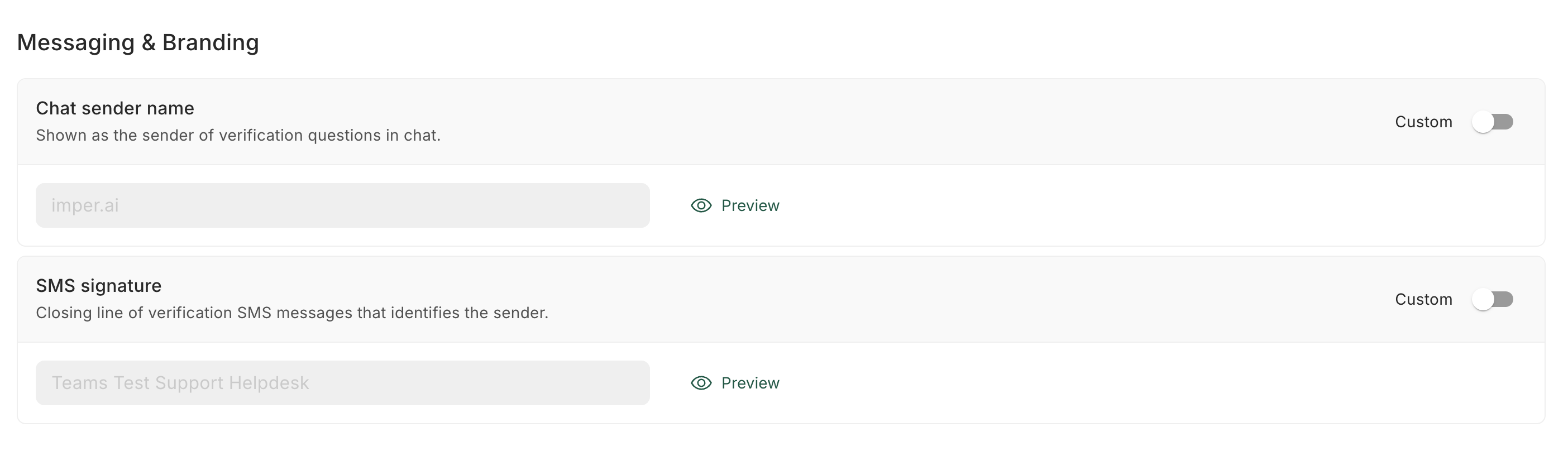
Control how imper.ai identifies itself in the verification messages it sends. Both settings can be configured:
| Setting | Description |
|---|---|
| Chat sender name | Shown as the sender of verification questions in chat. |
| SMS signature | Closing line of verification SMS messages that identifies the sender. |
To edit either setting, turn on its Custom toggle and change the text. To see how it will look, press Preview next to the changed text.
Verification Escalation
Verification Escalation controls what fallback options are offered when a user does not pass standard verification.
Medium Risk Escalation
The Medium Risk Escalation setting decides what happens when a user fails verification with medium risk - an uncertain result that isn't safe to pass automatically, but also isn't high-risk enough to block outright. Choose one of three options:
- None - no escalation option is offered. A medium-risk failed verification is treated the same as any other failure.
- Verify with Manager - the agent can confirm the user's identity through the user's manager by email. See Verify with Manager for the full flow.
- Verify via Document - the agent can confirm the user's identity through a government-issued document. See Verify with Document for the full flow.

Self Service Portal Actions
Configure the actions available to users in the Self-Service Portal (SSP) after a successful verification. When enabled, a verified user can complete these actions on their own - such as resetting their password - without involving a helpdesk agent.
You can also configure the password policy that applies when a user resets their password through the portal, ensuring new passwords meet your organization's complexity and security requirements.
