
Appearance
Overview
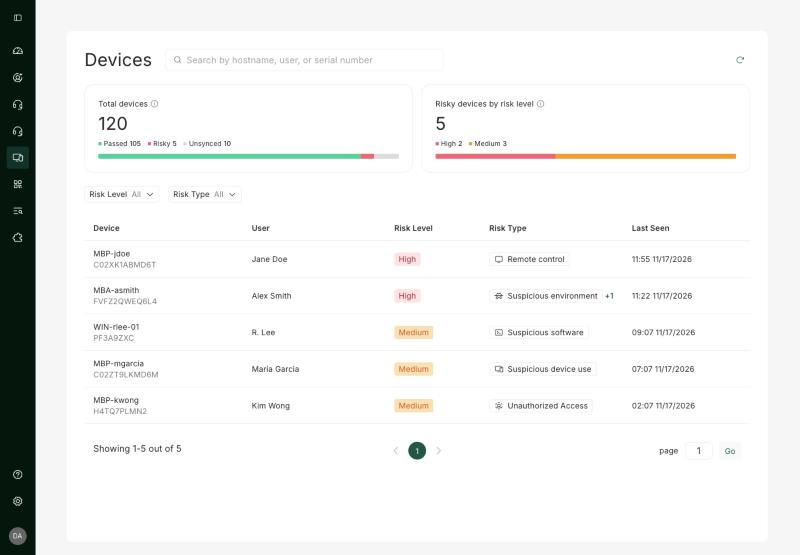
The Devices page lists the devices imper.ai monitors for Post-Hire Verification and highlights the ones with active risk indicators.
NOTE
For devices checked during a light POV, you choose how to receive the results: they can be added to this page after a delay, or sent to you as a report.
Summary cards
Two summary cards at the top of the view give an at-a-glance read.
Total devices - Shows the total number of enrolled devices associated with the blueprints configured by the admin on the Integrations page, broken down by verification status.
- Passed - devices that completed verification with no active risk indicators.
- Risky - devices with one or more active risk indicators. These are the devices listed below.
- Unsynced - devices that have not reported recent telemetry and could not be evaluated.
Risky devices by risk level - Shows the count of risky devices grouped by severity:
- High - devices with a critical risk indicator that warrants immediate review.
- Medium - devices with an elevated risk indicator that should be reviewed.
Devices List
The list shows every device currently flagged with a risk indicator. Each row represents one device and its highest-severity detection.
| Column | Description |
|---|---|
| Device | The device that reported telemetry. |
| User | The account associated with the device at the time of detection. |
| Risk level | The severity of the detection: High or Medium. |
| Risk type | The category of behavior or artifact that triggered the detection (for example, Remote control or Suspicious software). See Risk Types. |
| Last seen | The timestamp of the most recent telemetry report from the device. |
Device Details
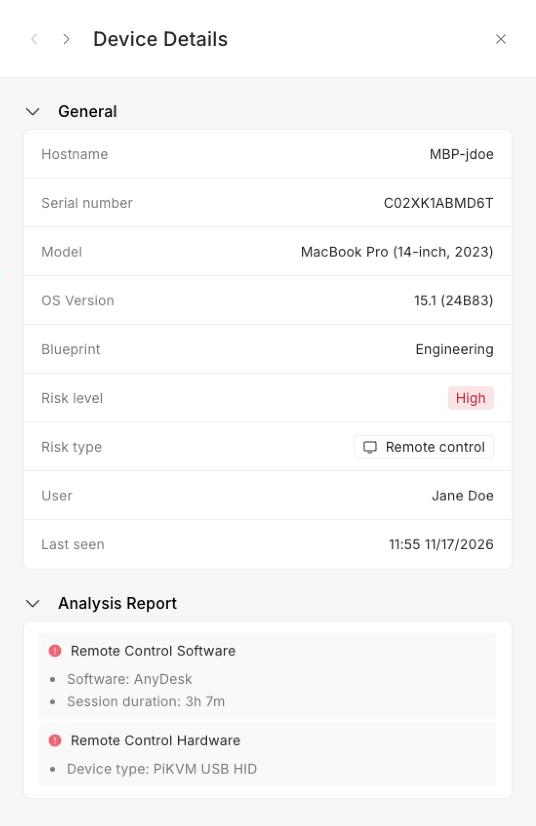
The Device Details pane is the drill-down view for a single device. Open it by selecting a device from the Devices list. It brings together the device's identifying information and the full set of detection events that contributed to its risk score, so you can investigate a flagged device and decide how to respond.
Need help or have a question? support@imper.ai